JABRA SPEAK 510 UC SPEAKERPHONE
$172.00$124.03
JABRA SPEAK 510 MS SPEAKERPHONE
Adding to inquiry lets you bundle multiple products into a single quote request.
Make every conference call productive | Take your conference room anywhere, at any time
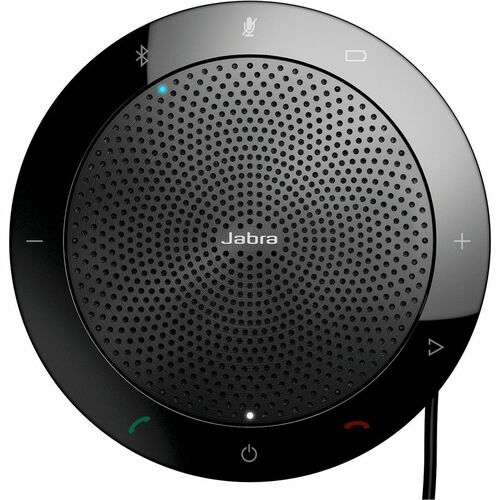
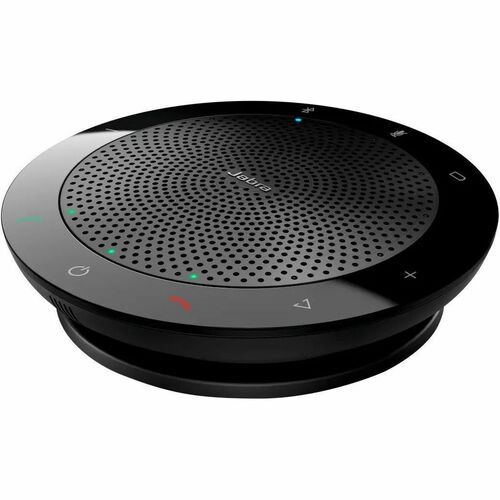
The Jabra Speak 510 is a portable speakerphone that gives you the power to turn any room into a conference room. Regardless of your location and your timeline, you can now join the conversation anytime, anywhere.
Slim and compact design.
Get the perfect solution for audio conferencing on demand, with a compact and lightweight design, integrated USB cable management for quick set-up, and a protective travel case.
Plug and Play solution
Plug in your USB cable or connect via Bluetooth®, and simply connect Jabra Speak to your PC, tablet or smartphone. That's it. You're ready to dial in
Outstanding sound quality
Enjoy get crystal-clear and natural sounding calls that allow attendees to hear and speak clearly across any location.
Unlimited mobility
Choose Jabra Speak 510, enhanced with Bluetooth, to connect to any smart phone and get the freedom to communicate on your terms.
Optimal user experience
Benefit from full compatibility - including call control - with the leading UC/Softphone solutions and any Bluetooth-enabled cell phone, smartphone or tablet.
How to connect | PC
Plug the Jabra Speak 510 USB cable into any available USB port on your PC. Select the Jabra Speak 510 as the default audio device in Windows Control Panel sound settings, and in your softphone audio settings.
How to charge
Plug the Jabra Speak 510 USB cable into any available USB port on your PC to charge the battery.
The battery light is red when charging, and green for 1 minute when fully charged.
| USB | Yes |
|---|---|
| Controls | Call |
| Features | LED Status Indicator |
| Brand Name | Jabra |
| Form Factor | Portable |
| Manufacturer | Jabra |
| Power Source | Battery |
| Product Line | Speak |
| Product Name | Speak 510 |
| Product Type | Speakerphone |
| Compatibility | <ul><li>PC</li><li>Tablets</li><li>Mobile Phones </li><li>Headsets</li></ul> |
| Polar Pattern | Omni-directional |
| Product Model | 510 |
|---|---|
| Host Interface | USB |
| Product Family | Speak |
| Bluetooth Range | 98.43 ft |
| Application/Usage | Conference Room |
| Battery Chemistry | Lithium Ion (Li-Ion) |
| Battery Talk Time | 15 Hour |
| Microphone Coverage | 360° |
| Plug & Play Support | Yes |
| Wireless Technology | Bluetooth |
| Battery Rechargeable | Yes |
| Connectivity Technology | Wired/Wireless |
| Manufacturer Part Number | 7510-109-01 |
| Manufacturer Website Address | http://www.jabra.com |
| Unified Communications Platform | Microsoft Teams |
More in AC-UNT from JABRA BUSINESS and similar brands
Other products available from this brand
Ask us about compatibility, pricing tiers, lead time, or anything else. We typically reply within one business day.
Actual pricing depends on volume, configuration, and current promotions. Reach out and we'll put together a real quote — often below this number.