STARTECH.COM

4 PORT USB C HUB USB 3.0 TYPE C EXPANSION HUB MINI LAPTOP USBC HUB

SKU: 5DP483VPN: HB30C4AIB

4 PORT USB C HUB USB 3.0 TYPE C EXPANSION HUB MINI LAPTOP USBC HUB

Key Features

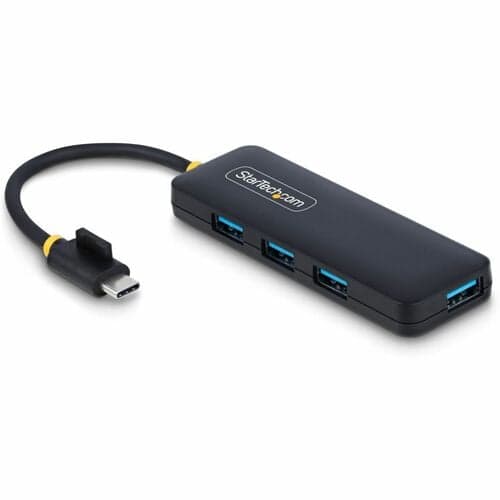
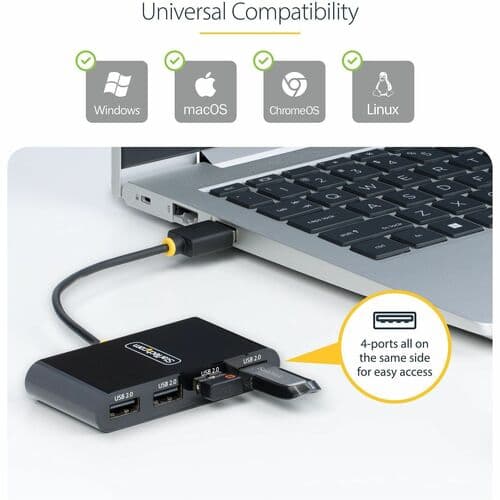
  • 4 PORT USB C HUB: Expand the connectivity of a USB-C laptop by adding 4x USB-A ports with individual port switches, using this USB 3.2/3.1 Gen 1 5Gbps hub; 15W power shared between downstream devices
  • INDIVIDUAL PORT SWITCHES: Each USB-A port has an on/off push button (w/ LEDs) to disconnect power/data to devices; Save energy by turning off SSD/thumb drives, web cams, headsets, etc. when not in use
  • MANAGE POWER & RESET DEVICES: Port switches enable you to direct power to selected peripherals, power on/off without physically unplugging the device which reduces wear and tear on the USB port
  • COMPACT & PORTABLE: A lightweight bus-powered adapter hub with black plastic housing, 9.8" (25 cm) attached USB-C host cable and small form factor [3.3in (85mm) x 1.4in (35mm) x 0.8in (1.9cm)]
  • WIDE COMPATIBILITY: USB-C laptop hub is OS independent, supporting major operating systems including Windows, macOS, Linux, iPadOS, Chrome OS and Android; USB 3.0/2.0 device compatible
Request a Quote on This Product

Adding to inquiry lets you bundle multiple products into a single quote request.

Overview

This portable USB-C™ hub gives you an easy way to add four USB 3.0 Type-A ports to your USB-C equipped laptop, tablet or smartphone, with individual power switches to conserve power. The USB-C to USB 3.0 hub plugs easily into your laptop's USB Type-C™ or Thunderbolt™ 3 port. Plus, it's bus-powered for easy portability. Connect Your Current USB Devices Use your existing USB 3.0 devices such as flash drives, mouse, keyboard and external hard drives. The 4-port USB 3.0 hub converts your computer's USB-C port into four USB 3.0 (Type-A ports), and it's backward compatible with your older USB 2.0 devices. (USB 3.0 is also known as USB 3.1 Gen 1.) Individual On/Off Switches Each USB port on the USB Type-C™ hub has its own power switch so you can turn off devices when they're not in use. That means you can better manage power consumption for your USB devices, without having to physically disconnect the device or cable. Use your existing USB 3.0 devices such as flash drives, mouse, keyboard and external hard drives. The 4-port USB 3.0 hub converts your computer's USB-C port into four USB 3.0 (Type-A ports), and it's backward compatible with your older USB 2.0 devices. (USB 3.0 is also known as USB 3.1 Gen 1.)Each USB port on the USB Type-C hub has its own power switch so you can turn off devices when they're not in use. That means you can better manage power consumptionfor your USB devices, without having to physically disconnect the device or cable.With its compact, lightweight design, this USB hub is designed for portable use. The versatile USB-C to USB hub is bus-powered, which means it draws its power directly from your computer's USB-C port, with no need for an external power adapter. You can travel lighter with fewer cables to carry with you.The 4-Port USB-C hub installs automatically once you connect it to your laptop, so you can be up and running in seconds.HB30C4AIB is backed by a StarTech.com 2-year warranty and free lifetime technical support.

Tech Specs

4 PORT USB C HUB USB 3.0 TYPE C EXPANSION HUB MINI LAPTOP USBC HUB specifications
Width1.4"
Height0.8"
Length3.3"
Brand NameStarTech.com
Form FactorExternal
Color FamilyBlack
ManufacturerStarTech.com
Product Name4-Port USB-C Hub - 4x USB-A with Individual On/Off Switches
Product TypeThunderbolt/USB Hub
UASP SupportYes
Product ColorBlack
Host InterfaceUSB Type C
Show all 22 specs
Package Contents<ul> <li>4-Port USB-C Hub - 4x USB-A with Individual On/Off Switches</li> <li>1 x Quick-start Guide</li> </ul>
Country of OriginChina
Packaged Quantity1 Each
Weight (Approximate)1.80 oz
Number of USB 3.0 Ports4
Environmental ComplianceWaste Electrical and Electronic Equipment Directive (WEEE)
Environmentally FriendlyYes
Manufacturer Part NumberHB30C4AIB
Total Number of USB Ports4
Manufacturer Website Addresshttp://www.startech.com

Datasheets & Resources

Have a question about this product?

Ask us about compatibility, pricing tiers, lead time, or anything else. We typically reply within one business day.

Request Quote