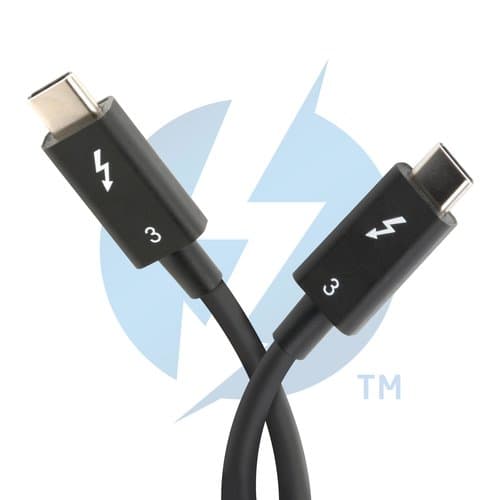
PLUGABLE TBT3-40G80CM TBT3 CABLE 40GBSP 100W CHARGING
$34.99$25.71
PLUGABLE UD-CAM USB-C AND TBT3 DOCK WITH 85W PD
Adding to inquiry lets you bundle multiple products into a single quote request.
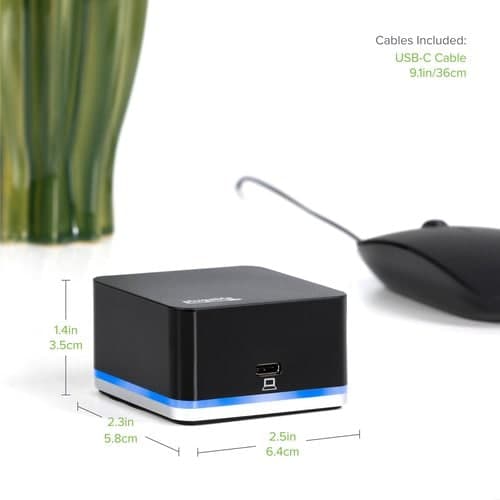
The Plugable UD-CAM USB-C Mini Docking Station provides an additional HDMI display output (via Alternate Mode, converted internally to HDMI for maximum compatibility), up to 85 Watts of Power Delivery (PD) to charge your host computer via USB-C (host computer must support PD over USB-C), gigabit Ethernet, audio, and expanded USB device connectivity. All through a single USB-C cable.
The UD-CAM docking station utilizes new USB-C functionality to output native video over compatible USB-C ports. USB-C ""Alternate Mode"" provides a direct pipeline to the graphics processor in your system, and your connected monitor will function and perform as a natively attached display. The Alternate Mode signal is converted to HDMI 1.4 to accommodate widely available HDMI monitors.
Compatible Systems
Plug and play installation on virtually any Windows, Mac, or Linux host which supports Alternate Mode (Alt Mode) video output functionality. Current examples are the 12"" Retina MacBook with USB-C / Late 2016 / 2017 MacBook Pro / Lenovo Yoga 720 13"" / Surface Book 2 / Dell XPS 13"" (9350/9360) / Pixelbook. Dell XPS 15"" (9550/9560) will function but displays a warning on boot if a 130W charger is not detected.
Power and Charging
The UD-CAM's power supply can charge hosts with up to 85 Watts of power via the USB Power Delivery standard. As mentioned above, some devices which support video output over USB-C will not charge via USB-C. For these systems, the charger from your system manufacturer will be required.
In the Box
UD-CAM Mini Docking Station,1m long USB-C cable, 100W (20V, 5A) power supply with US power plug, VESA Mount, and quick start guide.
| HDMI | Yes |
|---|---|
| Width | 3.90" |
| Height | 1.20" |
| Brand Name | Plugable |
| USB Type-A | Yes |
| Thunderbolt | Yes |
| HDMI Version | 1.4 |
| Manufacturer | Plugable Technologies |
| Product Name | USB-C Mini Docking Station with 85W Power Delivery |
| Product Type | Docking Station |
| Compatibility | <p><b>Acer Notebook:</b></p> <ul> <li>Chromebook 14</li> </ul> <p><b>Apple Notebooks:</b></p> <ul> <li>MacBook 12" Retina 2016<b> </b></li> <li>MacBook Pro 13" Late 2016 (non Touch Bar) </li> <li>MacBook Pro 15" Late 2016 (with Touch Bar)</li> <li>Macbook Pro 13" Early 2018 (with Touch Bar) <b> </b></li> </ul> <p><b>ASMedia Controller:</b></p> <ul> <li>USB 3.1 (Generic)<b> </b></li> </ul> <p><b>ASUS Notebook:</b></p> <ul> <li>Vivobook Max X541NA-PD1003Y<b> </b></li> </ul> <p><b>Dell Notebooks:</b></p> <ul> <li>Latitude 5580 <b> </b></li> <li>Latitude 7280 <b> </b></li> <li>XPS 13 9350 (Intel 6th Gen CPU) <b> </b></li> <li>XPS 13 9360 (Intel 7th Gen CPU) <b> </b></li> <li>XPS 15 9550 (Intel 6th Gen CPU)</li> <li>XPS 15 9560 (Intel 7th Gen CPU)</li> <li>XPS 15 9570 </li> </ul> <p><b>HP Products:</b></p> <ul> <li>Spectre X360 Convertible 13-AC0XX<b> </b></li> <li>Chromebook 13 G1 (TPN-Q176) <b> </b></li> <li>Elite Folio G1 <b> </b></li> <li>Elite X2 1012 G1<b> </b></li> </ul> <p><b>Huawei Notebooks:</b></p> <ul> <li>Matebook </li> </ul> <p><b>Lenovo Products:</b></p> <ul> <li>Yoga 720 13" 1st gen<b> </b></li> <li>Yoga 900 113ISK <b> </b></li> <li>Yoga 910 14"</li> <li>Yoga 920</li> <li>Miix 720 </li> <li>X1 Carbon 5th Gen</li> </ul> <p><b>Microsoft Notebook:</b></p> <ul> <li>Surface Book 2<b> </b></li> </ul> <p><b>Google Notebook:</b></p> <ul> <li>Pixelbook</li> </ul> <p><b>Samsung Notebook:</b></p> <ul> <li>Chromebook Plus (XE513C24)</li> </ul> <br />https://docs.google.com/spreadsheets/d/1y1BcngYaXtfc-mk-JjJ2j3XzmrRV_DaqaN7uxiAsFEw/htmlembed?gid=0&range=A1:CC999&widget=false&gridlines=true&chrome=false |
| Product Model | UD-CAM |
| Host Interface | USB 3.1 (Gen 1) Type C |
|---|---|
| Network (RJ-45) | Yes |
| Device Supported | Notebook |
| Limited Warranty | 2 Year |
| Package Contents | <ul> <li>USB-C Mini Docking Station with 85W Power Delivery</li> <li>1 x USB-C to USB-C Cable</li> <li>1 x Power Adapter</li> <li>1 x VESA Mount + Screws</li> </ul> |
| Country of Origin | Taiwan |
| Packaged Quantity | 1 |
| USB Power Delivery | 85W |
| Brand Compatibility | Acer |
| Ethernet Technology | Gigabit Ethernet |
| Weight (Approximate) | 6.30 oz |
| Number of RJ-45 Ports | 1 |
| Screen Mode Supported | 4K |
| Supported Resolutions | 1600 x 900 |
| Additional Information | <ul> <li>Cable | USB-C to USB-C</li> <li>Video Output | HDMI output via ""VESA DisplayPort over USB-C Alternate Mode"" (""Alt Mode""), DisplayPort signaling converted to HDMI internally. Requires VESA Alternate Mode support from host system</li> <li>Resolutions | Up to 4K@30Hz. 2560x1440, 1920x1080 and all lower modes support 60Hz</li> <li>Power Delivery | USB Power Delivery Compliant (PD 2.0)</li> <li>Power Adapter | 100W (20V/5A) UL Listed Power Adapter </li> <li>USB Ports (Front) | 1 x USB 3.0 Type-A</li> <li>USB Ports (Rear) | 3 x USB 3.0 Type-A, 1 x USB 3.1 Type-C to Host</li> <li>Ethernet | 1 x Gigabit Ethernet</li> <li>Audio | 1 x 3.5mm TRRS Headphone/Mic Combo Jack</li> </ul> |
| Number of HDMI Outputs | 1 |
| Connectivity Technology | Wired |
| Number of USB 3.0 Ports | 4 |
| Manufacturer Part Number | UD-CAM |
| Total Number of USB Ports | 4 |
| Number of USB Type-A Ports | 4 |
| Operating System Supported | ChromeOS |
| Manufacturer Website Address | http://www.plugable.com |
| Maximum Power Supply Wattage | 100 W |
| Number of Displays Supported | 1 |
| Headphone/Microphone Combo Port | Yes |
More in NB-DOC from PLUGABLE TECHNOLOGIES and similar brands
Other products available from this brand


Ask us about compatibility, pricing tiers, lead time, or anything else. We typically reply within one business day.
Actual pricing depends on volume, configuration, and current promotions. Reach out and we'll put together a real quote — often below this number.